Importing reward methods for composable campaigns
Composable Campaigns are a new campaign type in Spaaza Console. Unlike campaign types that define one reward outcome, a Composable Campaign can contain multiple reward methods. Each reward method can have its own value, delivery settings, redemption restrictions, limits, and customer-facing content.
Use the CSV importer when you need to add several reward methods, such as the prize pool for a scratch-card campaign. The import adds editable drafts to the campaign form. It does not save anything immediately: the reward methods and any new redeem groups are created only when you click Create Campaign or Save Changes on the campaign form.
Survey campaigns use this importer for completion rewards. While configuring those rewards on desktop, the inline survey preview stays in a phone-height sidebar; scroll inside it to inspect a longer survey. To bulk-add the questions customers answer, use Importing survey questions from CSV.
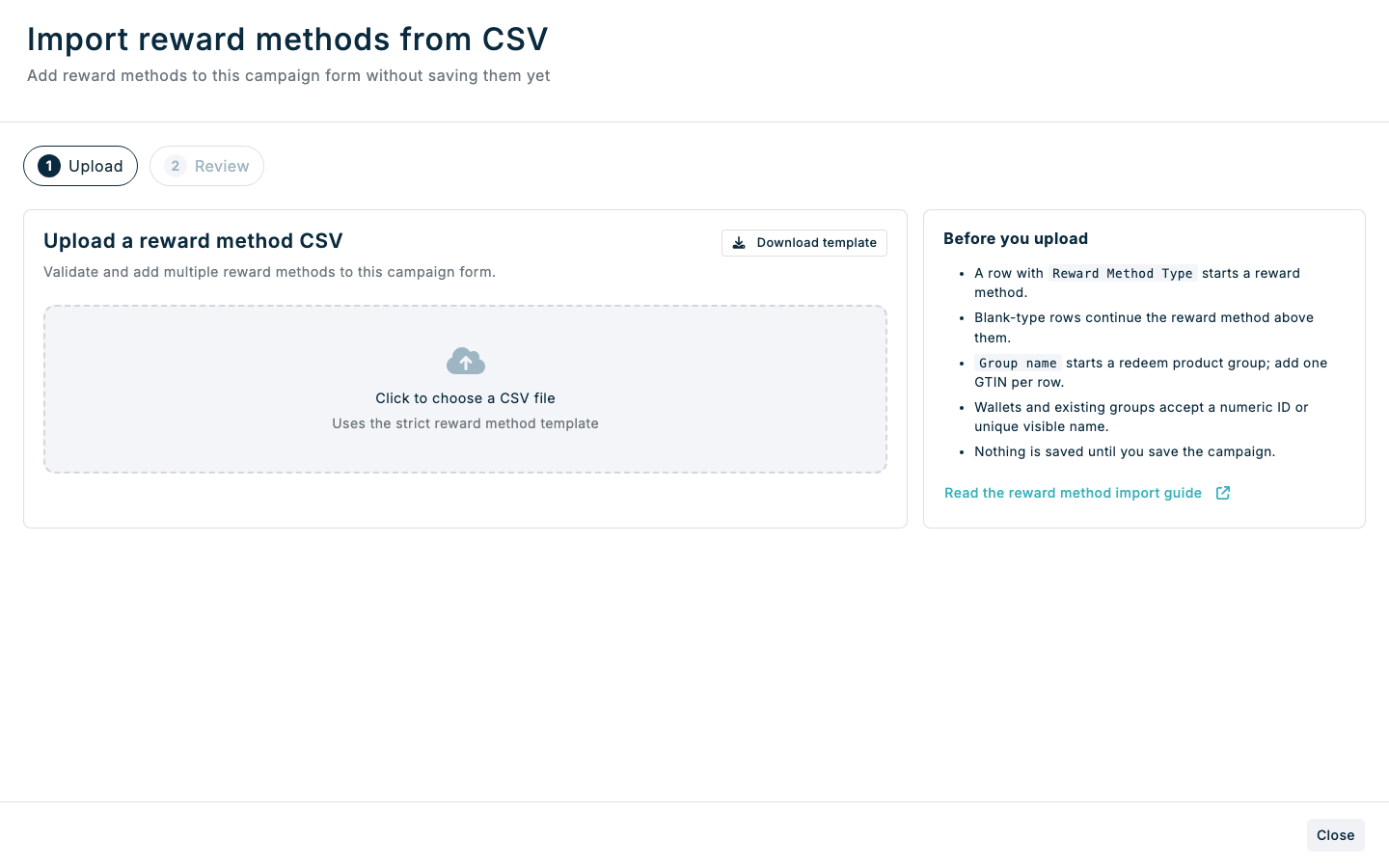
Expected result
- Every valid CSV reward method is appended to the campaign as an editable draft.
- Each reward method can have an optional Owner code for an internal identifier; saved owner codes are shown on reward summary cards and reward method overviews.
- A campaign with one reward method shows its complete editor in the campaign form. A campaign with multiple reward methods adds Campaign and Reward Methods (n) tabs.
- Rewards handling appears with the reward methods, including in the dedicated tab when the campaign has multiple rewards.
- Existing reward methods remain unchanged.
- Customer-facing voucher content stays with each reward method. The campaign's Promotional content section has no Vouchers part for Composable Campaigns, because that would duplicate the reward method settings.
- New redeem product groups are prepared with their GTINs and connected to the relevant imported reward.
- No imported data is saved until you save the Composable Campaign.
Import reward methods in Console
Step 1: Download the template
- For a new campaign, choose Composable | Basket or Composable | Interaction in the create campaign window. Choose the context that matches how the campaign will run; it cannot be changed after creation and remains visible in the campaign header.
- Open Reward methods, then click Import from CSV. You can also open an existing editable Composable Campaign.
- Click Download template, or download the reward method CSV template here.
- Keep every column header exactly as supplied. The template also contains an example of every supported reward method type; replace or remove the example rows before importing your own rewards.
Every column header in the template is required, even when its cells are optional. Do not rename a header or add * or another marker to it.
The values required in each row depend on the reward method type and campaign settings. The conditional requirements are listed below.
Step 2: Prepare the CSV
Each populated Reward Method Type starts a new reward method. Put scalar settings such as owner code, priority, value, voucher settings, limits, and metadata on this starting row.
Save the completed file as CSV. Choose CSV UTF-8 when your spreadsheet application offers it. Console also reads the common Western European Windows CSV encoding used by Excel, including accented characters such as ë.
A row with a blank Reward Method Type continues the reward method above it. Continuation rows can add another:
- existing redeem group;
- new redeem group or GTIN;
- store owner code;
- region;
- format; or
- currency.
Other populated fields on a continuation row are rejected. Repeated values are deduplicated during import.
Values that are required or conditionally required
| Value | When it is required |
|---|---|
| Reward Method Type | On the first row of every reward method. Leave it blank only on continuation rows. |
| Usage Limit | For every reward method when Rewards handling is Random draw. |
| Recipient Wallet | For wallet_contribution. |
| Group name | Before setting group options or adding GTINs for a new redeem group. |
| Assigned GTINs | At least one GTIN is required for every new redeem group. |
| Budget Period Quantity and Budget Period Unit | If either value is supplied, both must be supplied. |
| Usage Cost Wallet | When Usage Cost is supplied. |
All other values are optional. A blank optional cell keeps the same default used when adding that reward method manually, or leaves the optional restriction or metadata unset.
Supported reward method types
| Reward Method Type | Result | Campaign context |
|---|---|---|
instant_fixed_price | Applies a fixed item price in the current basket. | Basket only |
instant_fixed_discount | Applies a fixed discount in the current basket. | Basket only |
instant_percentage | Applies a percentage discount in the current basket. | Basket only |
deferred_fixed_price | Issues a fixed-price voucher for later redemption. | Basket, interaction, or internal |
deferred_fixed_discount | Issues a fixed-discount voucher for later redemption. | Basket, interaction, or internal |
deferred_percentage | Issues a percentage voucher for later redemption. | Basket, interaction, or internal |
wallet_contribution | Adds an entry to an active credit, points, or entries wallet. Item Count stamp wallets are not yet supported in Composable Campaigns. | Basket, interaction, or internal |
honour_voucher | Issues an externally honoured code or prize reference. | Basket, interaction, or internal |
Instant reward methods are invalid outside the basket context. Reward restrictions are not available in the internal context.
Add new redeem groups
- Enter a name in Group name and one product code in Assigned GTINs.
- Set Required matches and Exclude items in group on the same row, or leave them blank to use
0andNo. - Add more GTINs on continuation rows with Group name blank. Each Assigned GTINs cell must contain exactly one GTIN.
Starting another Group name closes the preceding group. You cannot reopen an earlier group in the same reward method. The same name and GTINs used under another reward method create a separate group for that reward.
Step 3: Upload and review
- In the import wizard, click the upload area and choose your completed CSV.
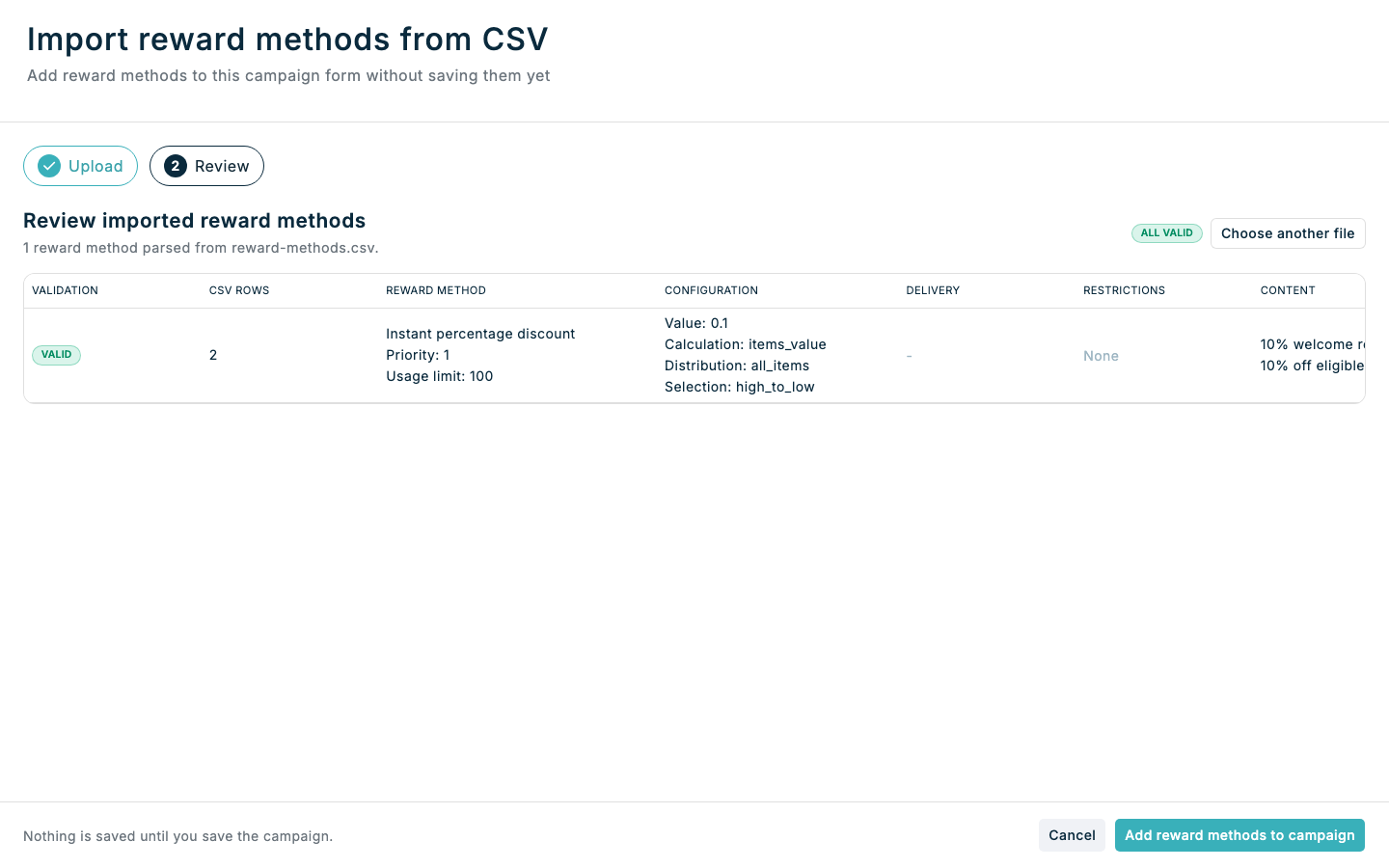
- In Review imported reward methods, inspect every parsed reward, its configuration, delivery settings, restrictions, content, and validation result.
- If any reward is marked Invalid, click Choose another file, correct the CSV, and upload it again. One invalid reward blocks the entire file.
- Review any warnings. Warnings do not block the import.
- Click Add reward methods to campaign.
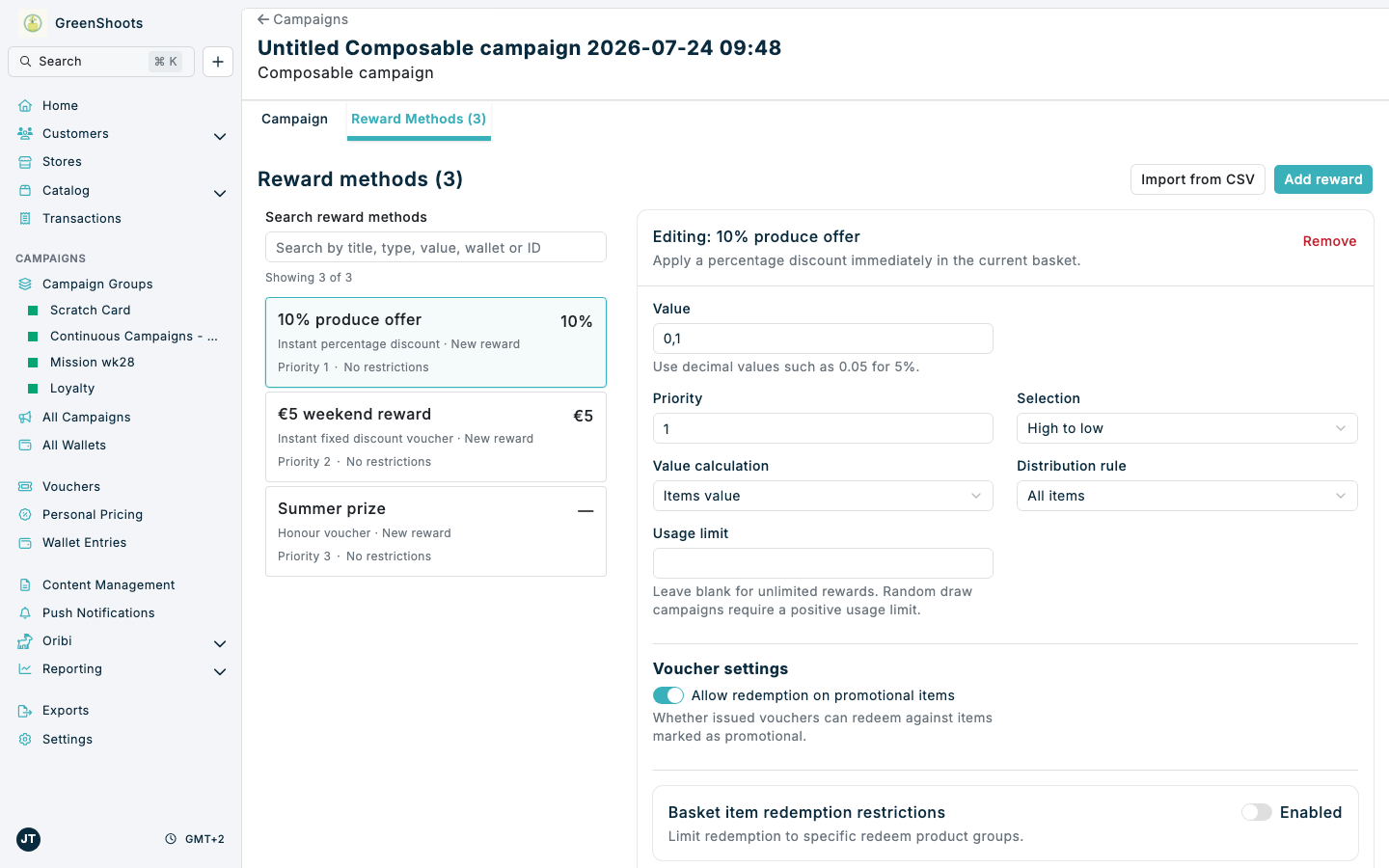
The imported reward methods now appear as editable drafts. When the campaign contains multiple rewards, Console opens the Reward Methods (n) tab. Use Search reward methods to filter by details including title, owner code, type, value, wallet, or ID, then select a summary card to edit that reward in the right column. The selected card stays highlighted beside its form, so you can move between rewards without scrolling through every full editor.
Use the Campaign tab to return to the campaign settings. Existing reward methods stay in place, and importing the same file again appends another copy. Closing or cancelling the wizard before the final action leaves the campaign unchanged.
Step 4: Save the campaign
- Review each imported reward. If the campaign has multiple rewards, open Reward Methods (n) and select each summary card to review or change its complete configuration.
- Click Create Campaign for a new campaign or Save Changes for an existing campaign.
- Confirm that the saved campaign contains the expected reward methods and redeem groups.
On the saved campaign Overview, the reward summary shows Rewards handling above the reward description. Use View reward methods to open the dedicated Reward methods (n) tab, where the complete handling card appears at the top. When there are multiple reward methods, use the search and summary cards in the left column to choose a reward; its overview card appears in the right column. Reward settings use the same readable labels as the campaign form, and referenced wallets and customer segments appear by name with links to their overview pages.
The normal campaign save creates any CSV-defined redeem groups, connects them to their reward methods, and saves the complete campaign. If you click Cancel, Console shows Cancel campaign changes? before leaving. Clicking Yes discards the imported drafts and all other unsaved campaign changes; click No to keep editing.
CSV field reference
The Status column below describes whether a cell value is optional or conditional. All template headers remain required.
Core configuration
| CSV column | Status | Accepted value and behaviour |
|---|---|---|
| Reward Method Type | Required on reward-start rows | One of the eight type values listed above. A blank cell continues the reward method above it. |
| Owner Code | Optional | An internal identifier for this reward method. |
| Priority | Optional | A whole number of 0 or more. Blank uses priority 1. |
| Usage Limit | Conditional | A positive whole number. Required for Random draw; otherwise blank means unlimited. |
| Value | Optional | A number of 0 or more. Percentage methods use a decimal from 0 to 1 with up to three decimal places, such as 0.1 for 10% or 0.983 for 98.3%. |
| Value Calculation Rule | Optional; not supported for honour_voucher | items_value, basket_value, fixed_value, fixed_value_per_basket, or fixed_value_per_spend. The three fixed_value rules are supported only for wallet_contribution. |
| Spend Step | Conditional | A positive whole number used only with fixed_value_per_spend. Blank uses 1. |
| Distribution Rule | Optional; not supported for honour_voucher | all_items, cheapest_item, or most_expensive. |
| Selection | Optional; not supported for honour_voucher | high_to_low or low_to_high. |
Type-specific settings
| CSV column | Status | Accepted value and behaviour |
|---|---|---|
| Recipient Wallet | Required for wallet_contribution | The numeric ID or unique, case-insensitive title of an active credit, points, or entries wallet. Item Count and Spend Target wallets are rejected because they are not yet supported as Composable Campaign recipients. |
| Honour Code | Optional for honour_voucher only | The externally honoured code or prize reference. |
| Voucher Claimed By Default | Optional for deferred reward types only | A boolean value. Blank uses No. |
| Voucher Expiry Seconds | Optional for deferred reward types only | A positive whole number. Do not combine it with Voucher Expiry Date. |
| Voucher Expiry Date | Optional for deferred reward types only | A non-past date in YYYY-MM-DD format. Do not combine it with Voucher Expiry Seconds. |
| Redeem On Promotional Items | Optional for instant and deferred reward types | A boolean value. Blank uses Yes. |
| Return Reclaims Earned Rewards | Optional for wallet_contribution only | A boolean value. Blank uses Yes. |
Boolean fields accept Yes/No, True/False, and 1/0.
Redeem product groups
These columns create a basket-item redemption restriction and are unavailable in the internal context.
| CSV column | Status | Accepted value and behaviour |
|---|---|---|
| Max Basket Items Considered | Optional | A positive whole number that caps how many matching basket items the reward is applied to at redemption. Blank considers all matching items. |
| Existing Redeem Group | Optional; repeatable | The numeric ID or unique, case-insensitive name of an existing redeem group. |
| Group name | Conditional | Starts a new CSV-defined redeem group. It is required before group options or GTINs can be supplied. |
| Required matches | Optional on the group-start row | A whole number of 0 or more. Blank uses 0. |
| Exclude items in group | Optional on the group-start row | A boolean value. Blank uses No. |
| Assigned GTINs | Required for a new group; repeatable | Exactly one GTIN per cell. Every new group must contain at least one. |
Business and currency restrictions
These columns are optional, repeatable across continuation rows, and unavailable in the internal context. Values must match options available to the current business.
| CSV column | Accepted value and behaviour |
|---|---|
| Store owner code | A store owner code that resolves to one unique store. |
| Regions | The name of an available business region. |
| Formats | The name of an available business format. |
| Currencies | An available currency code, such as EUR. |
Budget, limit, cost, and chance restrictions
These columns are optional and unavailable in the internal context.
In the survey context, only the Usage Cost columns are supported. Budget, Reward Limit, and Win Chance columns are not accepted for survey campaigns.
| CSV column | Status | Accepted value and behaviour |
|---|---|---|
| Budget | Optional | A number of 0 or more. A budget on a non-voucher reward produces a warning because it currently blocks only voucher-issuing reward methods. |
| Budget Period Quantity | Conditional | A positive whole number. Must be supplied together with Budget Period Unit. |
| Budget Period Unit | Conditional | year, month, week, day, or hour. Must be supplied together with Budget Period Quantity. |
| Reward Limit Quantity | Optional | A positive whole number. Supplying any reward-limit field enables the restriction; blank uses 1. |
| Reward Limit Unit | Optional | year, month, week, day, hour, or calendar_day. Blank uses month when the restriction is enabled. |
| Reward Limit Scale | Optional | A positive whole number. Blank uses 1 when the restriction is enabled. |
| Usage Cost Wallet | Conditional | The numeric ID or unique, case-insensitive title of an active supported wallet. Required when Usage Cost is supplied. Spend Target Wallet is not supported as a usage-cost wallet. |
| Usage Cost | Optional | A positive whole number. Blank uses 1 when Usage Cost Wallet enables the restriction. |
| Win Chance | Optional | A decimal from 0 to 1, such as 0.25 for a 25% chance. |
Reward metadata
| CSV column | Status | Accepted value and behaviour |
|---|---|---|
| Reward Title | Optional | The customer-facing reward title. |
| Reward Subtitle | Optional | The customer-facing reward subtitle. |
| Reward Description | Optional | The customer-facing reward description. |
| Reward Details | Optional | Additional reward details. |
| Reward Log Message | Optional | The message used when the reward is logged. |
| Reward Image URL | Optional | An absolute URL beginning with http:// or https://. |
Do not populate a type-specific field when it is unavailable for the selected reward method type. The review step marks that reward method invalid.
If something looks different
- If Import from CSV is disabled, check whether you are viewing a read-only internal-context campaign.
- If the wizard stays on Upload, correct the template-level errors shown below the upload area. Missing, renamed, extra, or duplicated headers are not accepted.
- If Add reward methods to campaign is disabled, at least one reward method is invalid. Use Choose another file, correct the reported rows, and upload the replacement file.
- If a wallet, store, or existing redeem group cannot be resolved by name, use its numeric ID where supported or make the visible name unique.
- If an Item Count wallet is rejected as a recipient, choose a credit, points, or entries wallet. Item Count stamp wallets are not yet supported by Composable Campaign reward methods or CSV imports.
- If a Spend Target Wallet is rejected as a recipient or usage-cost wallet, choose a supported credit, points, or entries wallet. Spend Target Wallet entries can currently be adjusted manually from a customer's Wallet Entries page, but campaigns cannot contribute to or spend from them yet.
- If an instant reward type is invalid, confirm the Composable Campaign uses the basket context.
- If text already contains the replacement character
�before upload, return to the original source data and export it again. The original character cannot be recovered from�. - If imported reward methods disappear after leaving the page, repeat the import and save the campaign before navigating away.