Change default campaign content settings
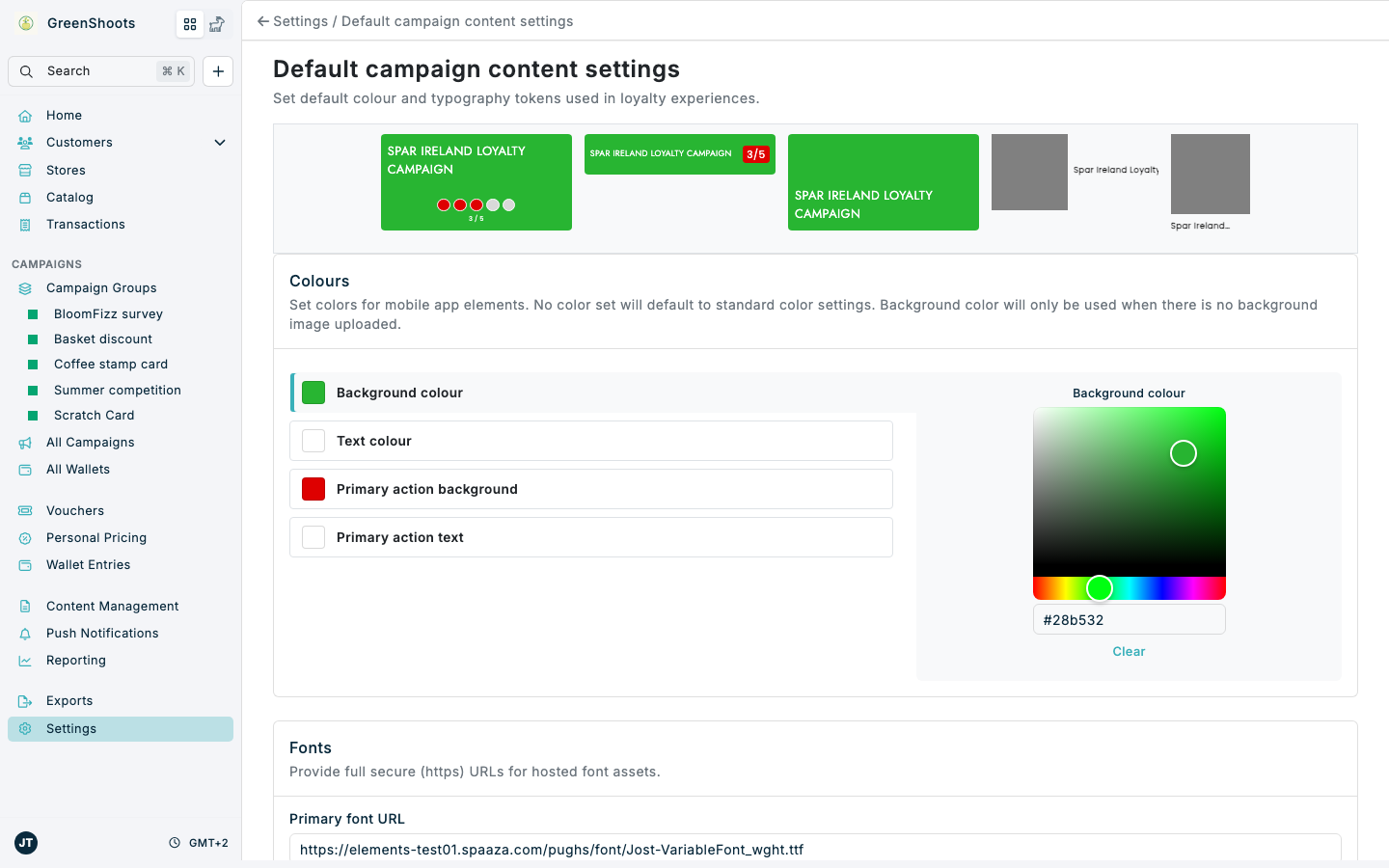
Use Default campaign content settings to set the default colours, font URLs, and member card images used in loyalty experiences. Campaigns without their own colours fall back to these defaults.
The preview strip at the top of the page shows every campaign layout with the current default colours and updates as you make changes.
Expected result
- The Settings overview is visible after you click Save.
- Colour defaults are saved for the background, text, primary action background, and primary action text roles.
- Primary font URL and Secondary font URL are saved when valid secure URLs are provided.
- Member card Image and Background image are uploaded or removed.
- Campaigns that show a Default ... colour active caption in Promotional content pick up the new colours.
- Console returns to Settings after the changes are saved.
Change default campaign content settings in Console
- Open Default campaign content settings.
- In Colours, click the colour role you want to change: Background colour, Text colour, Primary action background, or Primary action text.
- Pick a colour in the picker beside the list, or type a hex value in the field below it. Click Clear to remove the default for that role.
- Check the preview strip at the top of the page to confirm how the colours look on each layout.
- In Fonts, enter a secure full URL in Primary font URL when a hosted primary font should be used.
- Enter a secure full URL in Secondary font URL when a hosted secondary font should be used.
- In Member card images, upload or remove the Image and Background image used on the member card.
- Click Save.
Mobile App
Fonts need to be delivered as font files during the initial setup of the app. The font URL settings only change the preview in Console. See the Mobile App Onboarding section.
Embed Elements
Custom fonts need a one-time setup by your developers before they are shown on your website. They can find the details under Fonts in the Embed Elements developer documentation. Member card images are only used by Embed Elements.
If something looks different
- If your account runs more than one channel, channel buttons appear above Colours. Select the channel whose preview you want to check.
- If a colour does not save as expected, enter a hex colour value directly in the field below the picker.
- If a font URL is rejected, confirm it starts with
https://and includes the full path to the font asset. - If campaign content still differs in a campaign, open that campaign's Promotional content section. A colour without a Default ... colour active caption has been overridden for that campaign.