Change general settings
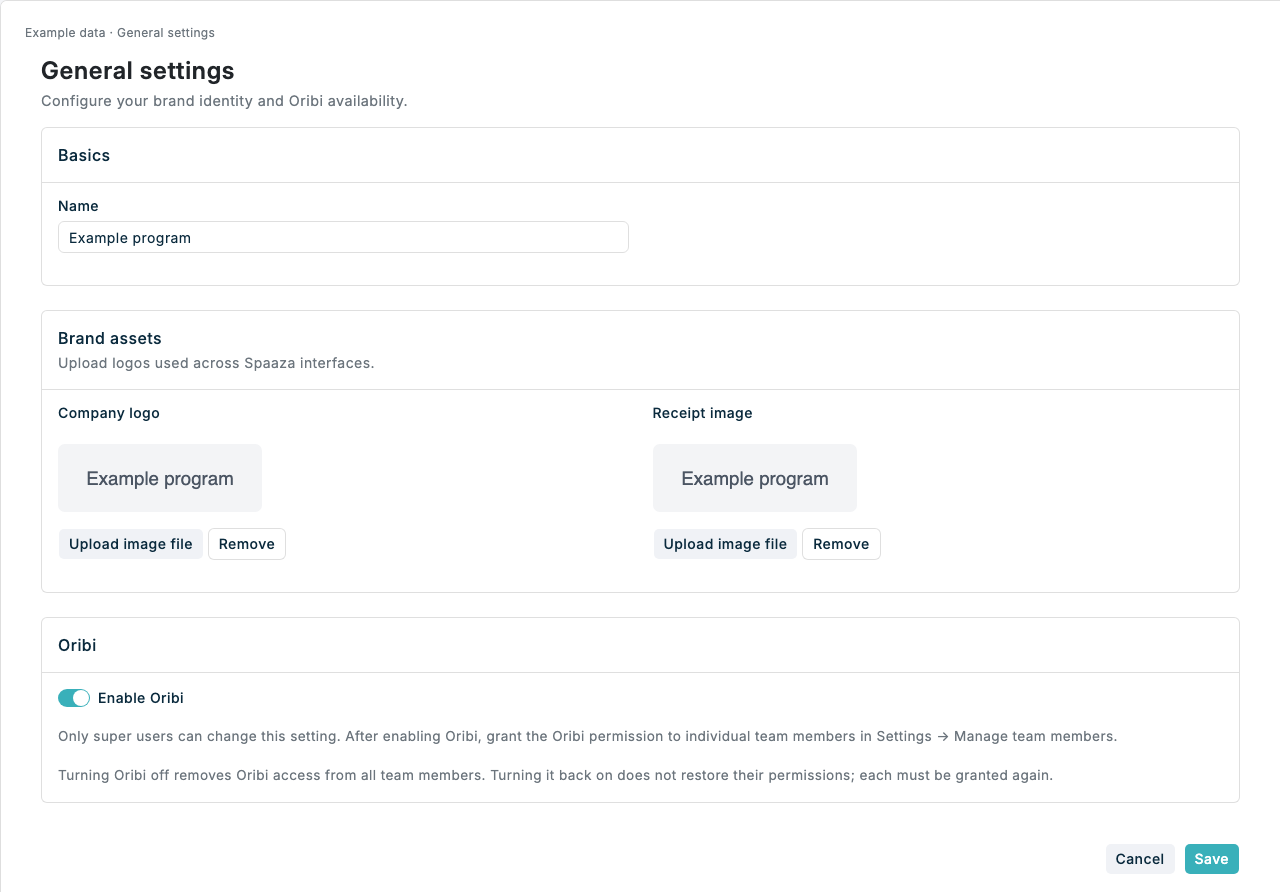
Use General settings to update the program name and brand images, and let super users enable Oribi for the program.
Expected result
- The Settings overview is visible after you click Save.
- The saved Name is used as the program display name.
- The Company logo and Receipt image are updated after upload.
Change general settings in Console
- Open General settings.
- In Basics, update Name when the program display name needs to change.
- In Brand assets, upload or replace the Company logo.
- Upload or replace the Receipt image when the receipt logo needs to change.
- Click Save.
- Confirm the Settings overview is visible.
Enable Oribi for your program
- Sign in as a super user and open Settings → General settings for the intended program.
- In Oribi, switch on Enable Oribi and click Save.
- Open Settings → Manage team members, edit a team member, and grant their Oribi permission. See Manage team members.
- Ask the team member to refresh Console after their access is updated. Home dashboards also require Analytics permission.
Enabling the program does not automatically grant access to anyone, including super users. Another super user must grant your own Oribi permission.
Turning Oribi off removes user permissions
Switching off Enable Oribi and saving revokes Oribi access for all team members in this program. Turning it back on does not restore their permissions; grant each team member access again.
If something looks different
- If Enable Oribi is disabled, ask a super user to change it.
- If an image does not preview after upload, check that the file is an image and is within the upload size limit.
- If Save does not keep the change, refresh General settings and confirm the new value is still shown.
- If you need to update store formats or reward rules, return to Settings and open the matching Configuration page.