Issue wallet entries through campaigns
Use campaigns when you want Spaaza to add wallet entries automatically after a customer qualifies for a campaign. Many campaign types let you choose a wallet-based reward in Rewards issued, so the wallet entry is created as soon as the campaign qualification criteria are met.
Expected result
- You can review the wallet reward configuration in Rewards issued before you save the campaign.
- You can select the target wallet and wallet entry amount.
- Wallet entries are issued automatically when the campaign conditions are met.
- Item Count wallets receive wallet entries as stamps.
- Spend Target Wallets are not offered as campaign contribution targets yet.
Issue wallet entries through campaigns in Console
- Open Campaign groups.
- Open the campaign group where the wallet reward campaign should live, or click Create a group and create a new campaign group first.
- In the campaign group, click Add campaign.
- Select Reward.
- In Create a campaign, choose a campaign type that supports wallet rewards, such as Spend Target, Signup, Birthday, Referral, or Profile Completion.
- In Basics, enter a Title.
- Configure the qualification sections for the selected campaign type. Depending on the campaign, this can include Timing, Config, Basket qualification, or Audience.
- In Rewards issued, choose the wallet-based reward method you want to use:
- Wallet contribution
- Credit contribution
- In Wallet to contribute to, click Choose wallet.
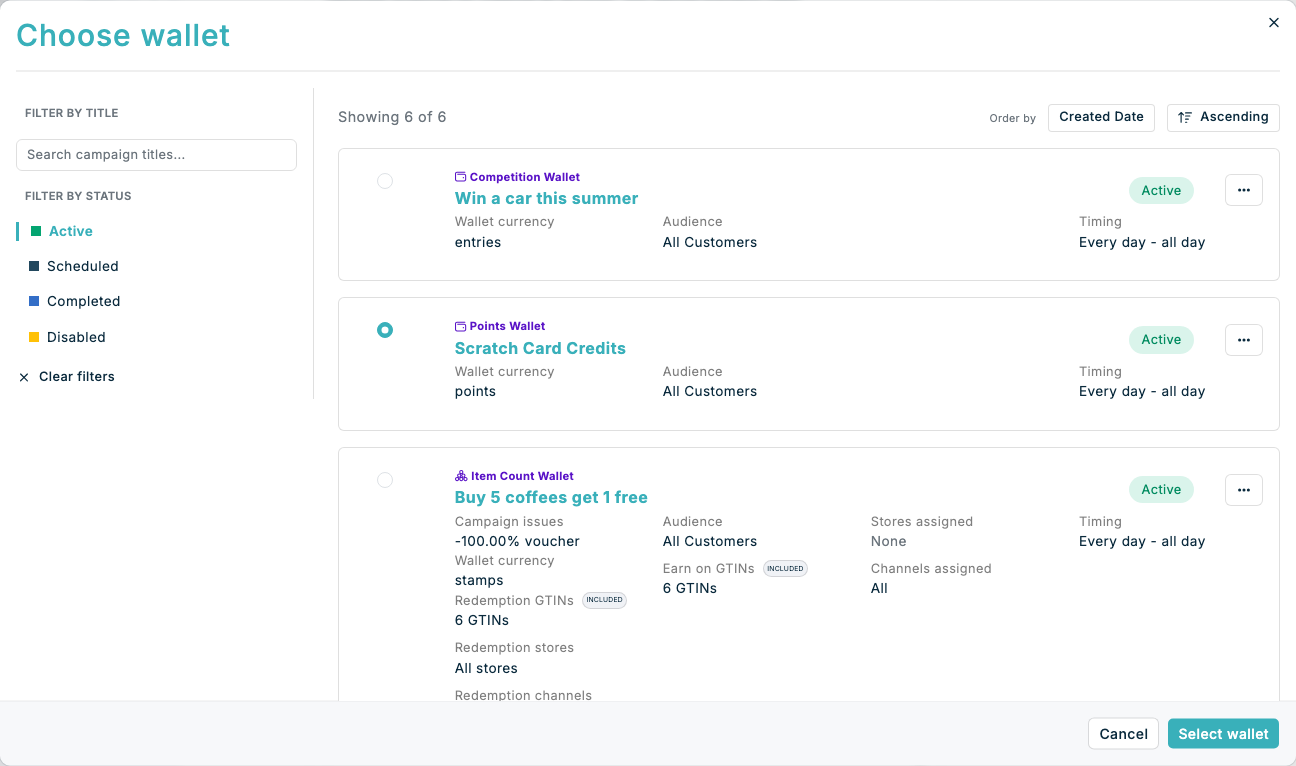
- In the Choose wallet dialog, use Filter by Title and Filter by Status to find the wallet that should receive the entry. Use the page controls when there are more results.
- Select a compatible target wallet, then click Select wallet:
- Wallet contribution can issue entries to a Points Wallet, Competition Wallet, or Item Count wallet.
- Credit contribution issues monetary value to a Credit Wallet.
- Entries issued to an Item Count wallet are shown as stamps. Decimal stamp values are supported.
- Spend Target Wallet does not appear because campaign contributions to this wallet type are not yet supported.
- Set Wallet entry amount.
- Optional: add a Transaction message if you want a specific message returned with the wallet entry.
- Turn on Enable Campaign.
- Click Create.
Composable campaigns also show Item Count wallets in Recipient wallet, but they are currently disabled with Stamp wallets are not yet supported. Use a non-composable campaign when the target wallet holds stamps.
If something looks different
- If you do not see Create a campaign, make sure you opened Add campaign from a campaign group and selected Reward.
- If you do not see wallet reward options in Rewards issued, the selected campaign type may not support wallet rewards.
- If the Choose wallet dialog has no results, clear or change the title and status filters, then confirm that a compatible wallet exists.
- If an Item Count wallet is disabled, confirm that you are not configuring a composable campaign.
- To adjust one customer's Spend Target Wallet progress, use Wallet Entries on the customer profile instead.
- If you need to issue wallet entries to a fixed segment or CSV list on a schedule, use Issuing wallet entries to a group of customers instead.