Manually add wallet entries
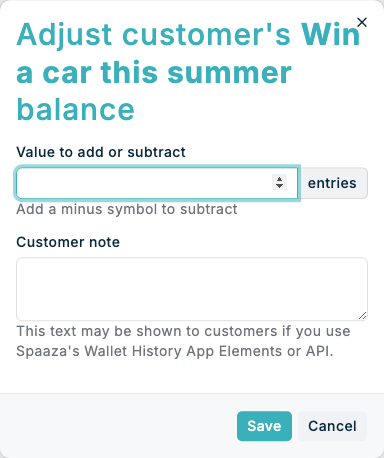
Use the customer profile when you need to add or subtract wallet value for one person directly. This is useful for customer support, service recovery, or account corrections that should not wait for a campaign or bulk task.
Expected result
- You can open the selected customer’s wallet history.
- You can add or subtract a value with a customer-facing note.
- The new manual entry appears in the Entry history section for that wallet.
Manually add wallet entries in Console
- Open the customer you want to update in Customers.
- Open Wallet Entries in the customer navigation. This page shows active points, credit, competition, Item Count, and Spend Target wallets using the standard campaign cards. Use the status filter if you need to find an older completed or disabled wallet.
- Find the wallet card you want to update and click Add or remove entries in its customer details section.
- In Adjust customer's wallet balance, enter Value to add or subtract. The wallet currency or entry unit is shown beside the value. Spend Target Wallet adjustments use the program currency.
- Add a Customer note. The multiline note can be shown in wallet history views.
- Click Save.
- Review Entry history and confirm that the new row appears with Manual in the Type column. For longer histories, click Show all entries to expand the table.
If something looks different
- If Add or remove entries is not shown, check that you opened an individual customer profile and selected Wallet Entries.
- If the entry should reduce the balance, enter the value with a minus sign.
- If the new entry is not visible immediately, refresh the customer page and open Wallet Entries again.